
What Is the Fastest Way to Create BPMN Diagrams?

Creating a Business Process Model and Notation (BPMN) diagram is an important step in understanding, documenting and improving business processes. But there are different ways to create these diagrams, and each approach offers its own advantages.
Traditionally, BPMN diagrams were created using drag-and-drop editors. Today, AI can generate diagrams from natural language, while text-based modeling tools let users create diagrams simply by writing structured descriptions.
In this article, we compare three approaches to BPMN modeling: drag-and-drop, AI-generated BPMN and syntax-to-BPMN, and explore which method works best in different situations.
The short answer: AI is the fastest way to a first draft from a description. Syntax-to-BPMN is the fastest way to create and keep changing a model, for example during a workshop. Drag-and-drop is the fastest choice when precise control over the layout matters most.
1. Drag-and-drop BPMN modeling
Drag-and-drop is the traditional and perhaps most familiar way to create BPMN diagrams.
Tools such as Lucidchart, Microsoft Visio, diagrams.net (draw.io) and bpmn.io let users build diagrams visually by selecting BPMN elements, placing them on a canvas and connecting them.
For example, when modeling an order approval process, users can add activities, insert decision gateways, connect different process paths and arrange the diagram to their preferences.
Why use drag-and-drop?
The biggest advantage is visual flexibility. Users have direct control over where elements appear and how the diagram is organized.
This makes drag-and-drop particularly useful for detailed diagrams, customized layouts and users who prefer working visually.
Many platforms also support other diagram types, making them versatile tools for broader business documentation.
The main consideration is that creating and updating diagrams involves manual interactions. Adding activities, connecting elements and adjusting layouts can take time, particularly for larger processes.
For users who value precise visual control, however, drag-and-drop remains an effective approach.
2. AI-generated BPMN diagrams
Artificial intelligence offers another way to create BPMN diagrams: generating them directly from natural-language descriptions.
Instead of manually constructing a process, users describe what happens, and an AI-powered tool translates that description into a diagram.
For example:
"A customer submits an application. An employee reviews it. If the application is complete, it is approved. Otherwise, additional information is requested."
An AI tool can interpret this description and generate an initial process model.
Platforms such as ProcessMaker, BPMN Studio and Visual Paradigm offer AI-assisted BPMN modeling capabilities. Tools such as Eraser also demonstrate how AI can simplify diagram creation more generally.
Why use AI for BPMN?
The biggest benefit is speed of initial generation.
Users can create a first draft from a simple description without manually placing activities or learning a modeling syntax.
AI is particularly useful for brainstorming, exploring process ideas and helping users get started with process modeling.
It can also make diagram creation more accessible to people with limited BPMN experience.
Generated diagrams may still need review or refinement, especially when processes contain complex decisions or exceptions. Depending on the tool, users can make adjustments through additional prompts, text editing or a visual editor.
AI is therefore an attractive option for users who want to quickly turn ideas into diagrams with minimal initial effort.
3. Syntax-to-BPMN: creating diagrams by writing
A third approach is to create diagrams using code or structured text.
Instead of manually drawing elements or relying on AI to interpret a process, users write a description in a modeling language. The software automatically converts this description into a visual diagram.
This approach is often called text-based modeling or diagram-as-code. Our guide to text to BPMN explains how to write a process description that converts cleanly into a diagram.
Mermaid: diagrams as code
One of the best-known examples is Mermaid, a tool that generates diagrams from text-based definitions.
Mermaid supports flowcharts, sequence diagrams and other visualizations. It is particularly popular in technical documentation, where diagrams can be maintained alongside code.
Although Mermaid can represent business workflows using flowcharts, it does not natively support the complete BPMN standard.
BPMN Sketch Miner: rapid process modeling
BPMN Sketch Miner is a research-based tool developed by Ana Ivanchikj, Souhaila Serbout and Cesare Pautasso.
It explores how structured textual descriptions can be used to quickly generate BPMN diagrams, particularly during interviews and process workshops.
By automatically converting text into visual models, BPMN Sketch Miner demonstrates how process modeling can become more efficient without manually drawing every element.
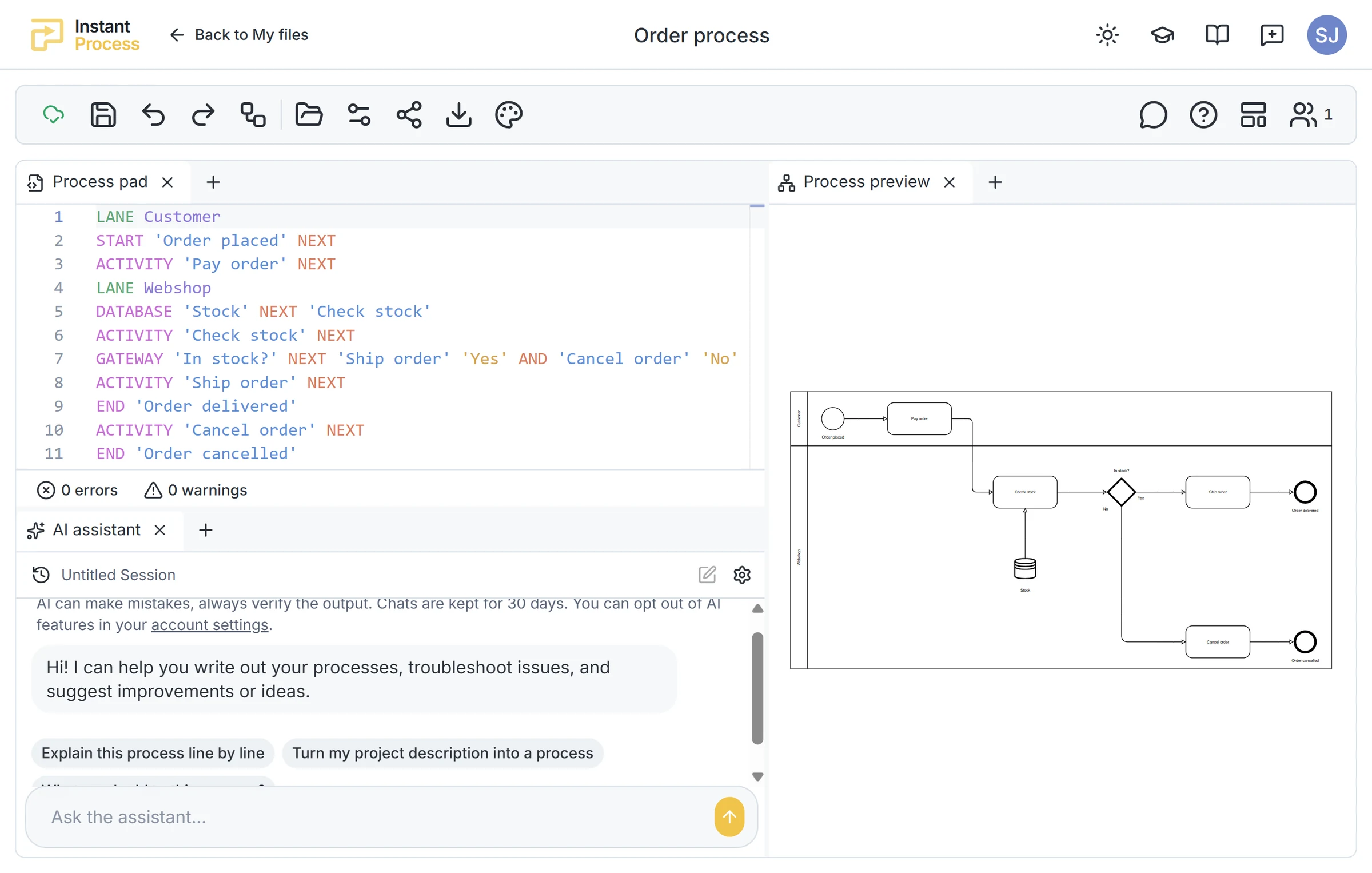
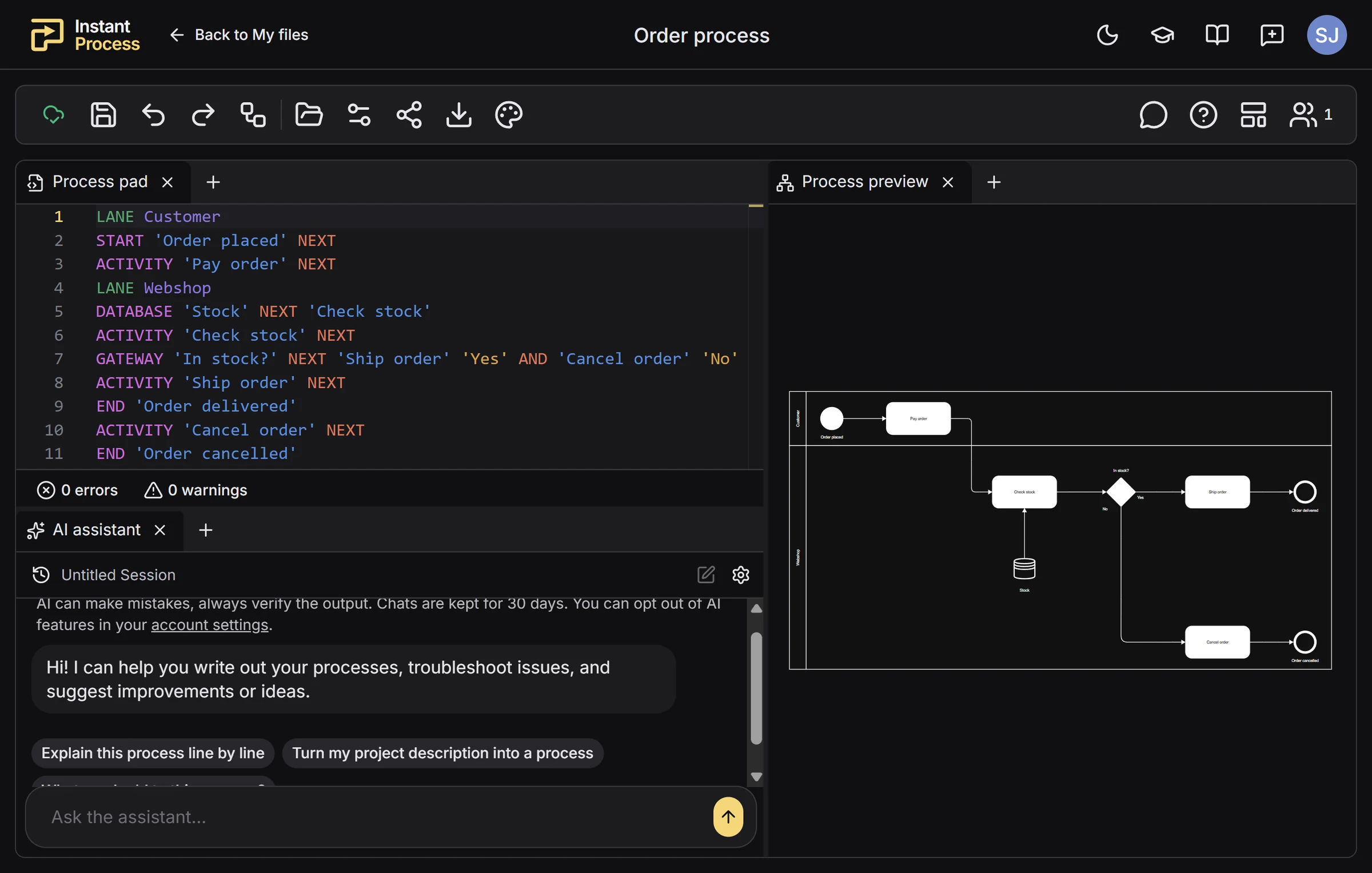
Instant Process: syntax designed for BPMN
Instant Process is another example of syntax-based BPMN modeling.
Unlike general-purpose diagram-as-code tools, Instant Process uses a modeling language specifically designed for creating BPMN diagrams quickly.
Users describe activities, decisions and process flows using a simple syntax, while the corresponding BPMN diagram updates in real time.
Keyboard shortcuts and autocomplete further reduce the amount of typing required.
The approach is designed to help users model processes during meetings and workshops, with direct control over the process structure and BPMN conventions. Our guide on how to map a business process in one meeting shows how such a session can be structured.
Why use syntax-to-BPMN?
The main advantage is fast, structured editing.
Users can write and modify process descriptions without manually positioning or reconnecting diagram elements.
This is especially useful when processes evolve during conversations, as changes can be made directly in the text while the diagram updates automatically.
Syntax-based modeling does require some familiarity with the modeling language, but shortcuts and autocomplete can make the learning process easier.
For users who frequently create and update BPMN diagrams, this approach can provide an efficient alternative to visual modeling.
4. Which BPMN modeling approach should you choose?
Each approach offers different benefits depending on your goals.
| Approach | Main benefit | Best suited for |
|---|---|---|
| Drag-and-drop | Visual flexibility and precise layout control | Detailed diagrams and visual customization |
| AI-generated BPMN | Fast diagram generation from natural language | Brainstorming, initial drafts and occasional modeling |
| Syntax-to-BPMN | Fast, structured editing with automatic visualization | Workshops, process documentation and frequent updates |
If you prefer working visually and want full control over the diagram's appearance, drag-and-drop tools such as Lucidchart or bpmn.io may be the right choice.
If you want to quickly generate a diagram from a description, AI-powered BPMN tools can save considerable time.
If you frequently create, update and validate process models, syntax-based tools can help reduce manual work while maintaining direct control over the structure. You can compare the Instant Process plans to see what the free tier includes.
Conclusion
There is no single fastest way to create BPMN diagrams for every situation.
Drag-and-drop offers visual flexibility, AI provides quick initial results, and syntax-to-BPMN makes it possible to create and modify diagrams through structured text.
As process modeling tools continue to evolve, users have more options than ever to document business processes efficiently.
Ultimately, the best BPMN modeling tool is the one that fits your workflow and helps you spend less time creating diagrams and more time understanding and improving your processes.
As-Is vs. To-Be Process Mapping
How to improve a business process diagram without modeling everything twice
How to Map a Business Process in One Meeting
A practical facilitator's guide to capturing a complete business process model in a single meeting, from the happy path to the exceptions that reveal how work really happens.